Workflow Clarity Audit · sample
Peninsula Pool Care
Where the enquiries go missing
What I found when I looked at how enquiries reach a four-van pool business, and what to fix first.
- Prepared for
- Mel Tran, Peninsula Pool Care, Rosebud (fictional)
- Prepared by
- John Costabile, Lumomatics
- Format
- PDF + shared document
- Questions
- 14-day Q&A window after delivery
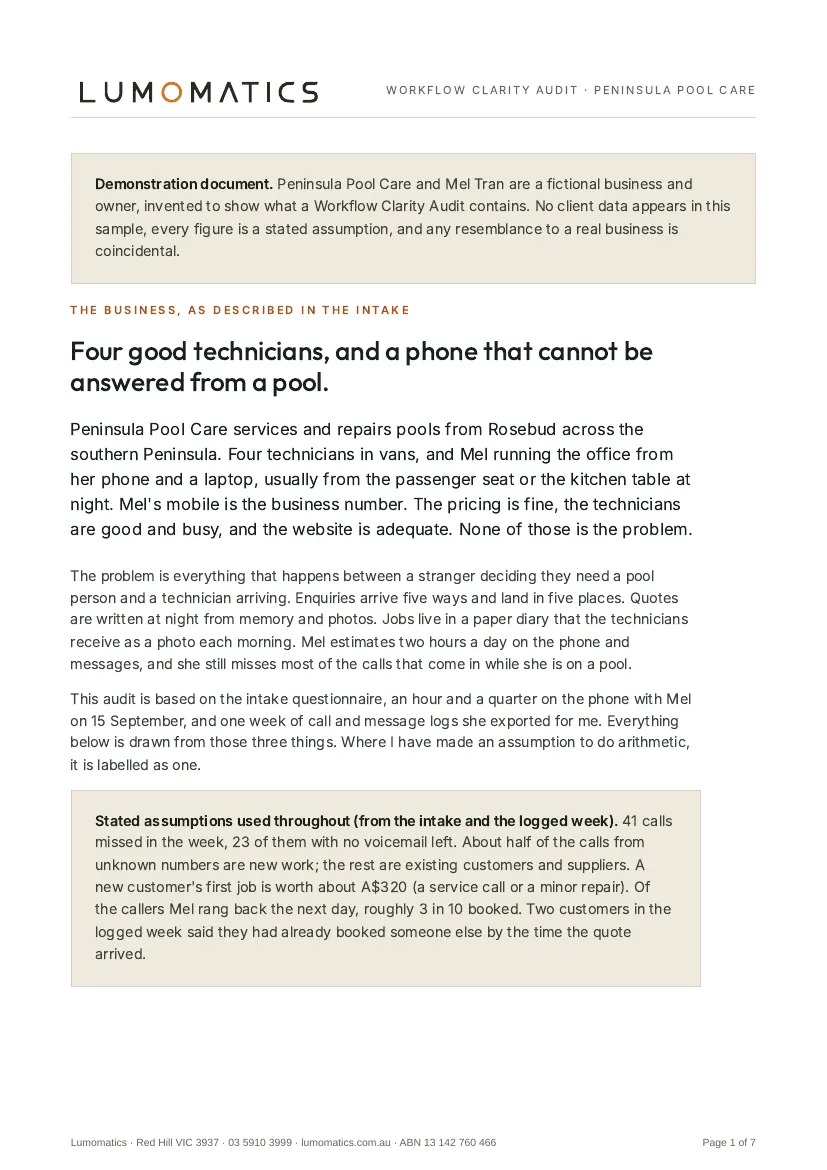
The business, as described in the intake
Peninsula Pool Care services and repairs pools from Rosebud across the southern Peninsula. Four technicians in vans, and Mel running the office from her phone and a laptop, usually from the passenger seat or the kitchen table at night. Mel's mobile is the business number. The pricing is fine, the technicians are good and busy, and the website is adequate. None of those is the problem.
The problem is everything that happens between a stranger deciding they need a pool person and a technician arriving. Enquiries arrive five ways and land in five places. Quotes are written at night from memory and photos. Jobs live in a paper diary that the technicians receive as a photo each morning. Mel estimates two hours a day on the phone and messages, and she still misses most of the calls that come in while she is on a pool.
This audit is based on the intake questionnaire, an hour and a quarter on the phone with Mel on 15 September, and one week of call and message logs she exported for me. Everything below is drawn from those three things. Where I have made an assumption to do arithmetic, it is labelled as one.
Stated assumptions used throughout (from the intake and the logged week): 41 calls missed in the week, 23 of them with no voicemail left. About half of the calls from unknown numbers are new work; the rest are existing customers and suppliers. A new customer's first job is worth about A$320 (a service call or a minor repair). Of the callers Mel rang back the next day, roughly 3 in 10 booked. Two customers in the logged week said they had already booked someone else by the time the quote arrived.
01
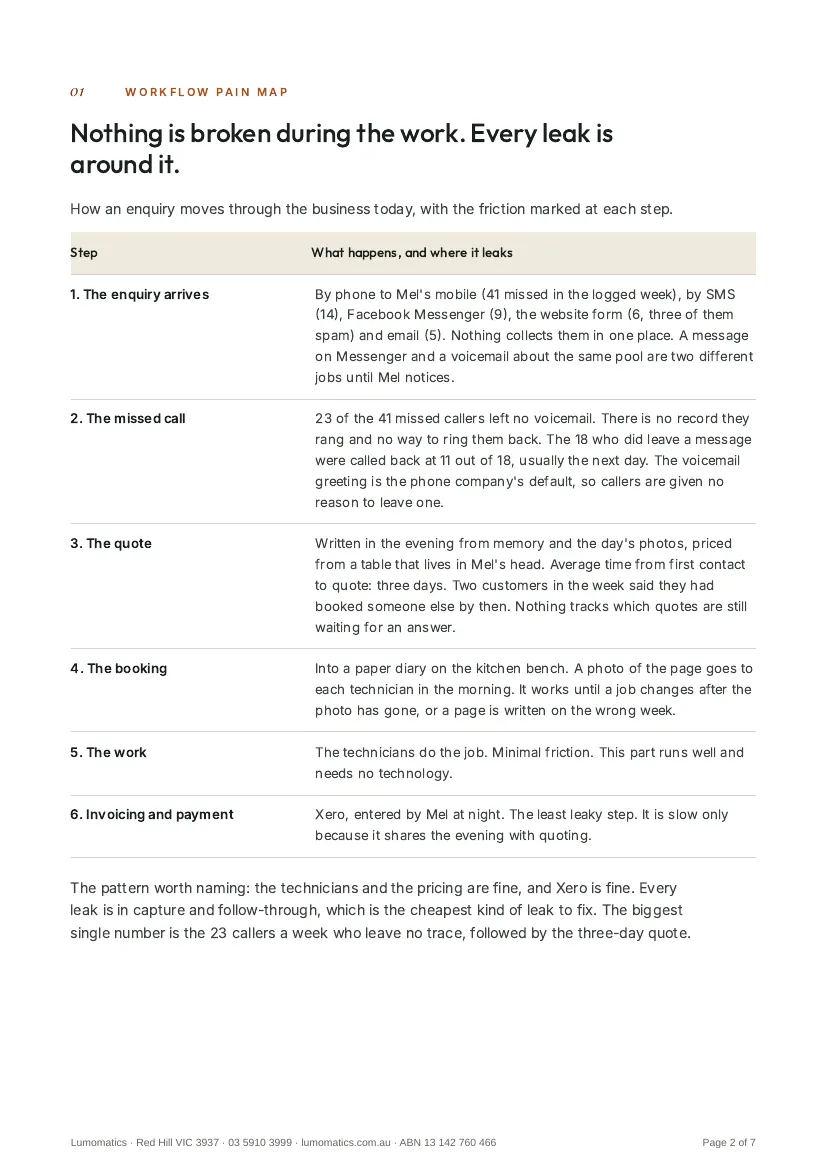
Workflow pain map: nothing is broken during the work. Every leak is around it.
How an enquiry moves through the business today, with the friction marked at each step.
- The enquiry arrives by phone to Mel's mobile, by SMS, Facebook Messenger, the website form or email. Friction: five channels, five places. In the logged week: 41 calls missed, 14 texts, 9 Messenger threads, 6 form submissions (three of them spam) and 5 emails. A message on Messenger and a voicemail about the same pool are two different jobs until Mel notices.
- The missed call goes to the phone company's default voicemail greeting. Friction: 23 of the 41 missed callers left no voicemail. There is no record they rang and no way to ring them back. The 18 who did leave a message were called back at 11 out of 18, usually the next day.
- The quote is written in the evening from memory and the day's photos, priced from a table that lives in Mel's head. Friction: average time from first contact to quote is three days. Two customers in the week said they had booked someone else by then. Nothing tracks which quotes are still waiting for an answer.
- The booking goes into a paper diary on the kitchen bench; a photo of the page goes to each technician in the morning. Friction: it works until a job changes after the photo has gone, or a page is written on the wrong week.
- The work. The technicians do the job. Minimal friction. This part runs well and needs no technology.
- Invoicing and payment in Xero, entered by Mel at night. The least leaky step. It is slow only because it shares the evening with quoting.
The pattern worth naming: the technicians and the pricing are fine, and Xero is fine. Every leak is in capture and follow-through, which is the cheapest kind of leak to fix. The biggest single number is the 23 callers a week who leave no trace, followed by the three-day quote.
02
Top three improvement opportunities
-
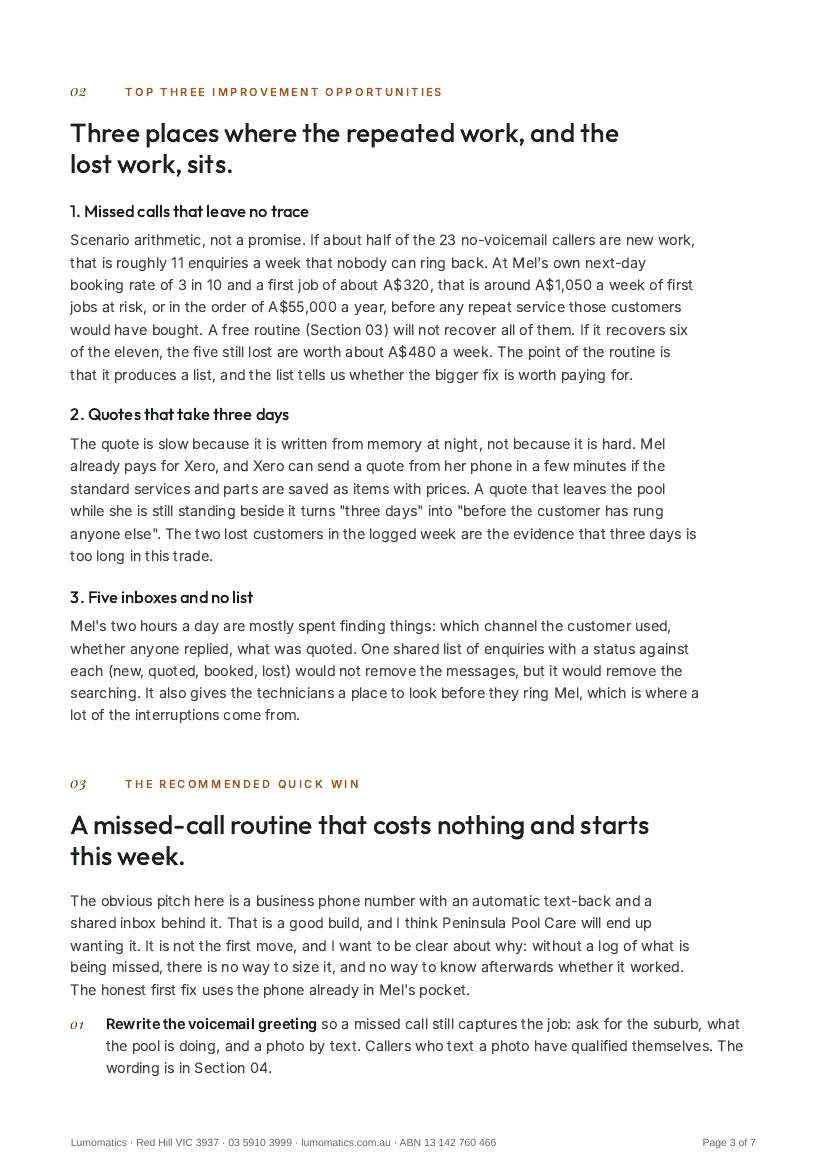
Missed calls that leave no trace
Scenario arithmetic, not a promise. If about half of the 23 no-voicemail callers are new work, that is roughly 11 enquiries a week that nobody can ring back. At Mel's own next-day booking rate of 3 in 10 and a first job of about A$320, that is around A$1,050 a week of first jobs at risk, or in the order of A$55,000 a year, before any repeat service those customers would have bought. A free routine (Section 03) will not recover all of them. If it recovers six of the eleven, the five still lost are worth about A$480 a week. The point of the routine is that it produces a list, and the list tells us whether the bigger fix is worth paying for.
-
Quotes that take three days
The quote is slow because it is written from memory at night, not because it is hard. Mel already pays for Xero, and Xero can send a quote from her phone in a few minutes if the standard services and parts are saved as items with prices. A quote that leaves the pool while she is still standing beside it turns "three days" into "before the customer has rung anyone else". The two lost customers in the logged week are the evidence that three days is too long in this trade.
-
Five inboxes and no list
Mel's two hours a day are mostly spent finding things: which channel the customer used, whether anyone replied, what was quoted. One shared list of enquiries with a status against each (new, quoted, booked, lost) would not remove the messages, but it would remove the searching. It also gives the technicians a place to look before they ring Mel, which is where a lot of the interruptions come from.
03
The recommended quick win: a missed-call routine that costs nothing and starts this week
The obvious pitch here is a business phone number with an automatic text-back and a shared inbox behind it. That is a good build, and I think Peninsula Pool Care will end up wanting it. It is not the first move, and I want to be clear about why: without a log of what is being missed, there is no way to size it, and no way to know afterwards whether it worked. The honest first fix uses the phone already in Mel's pocket.
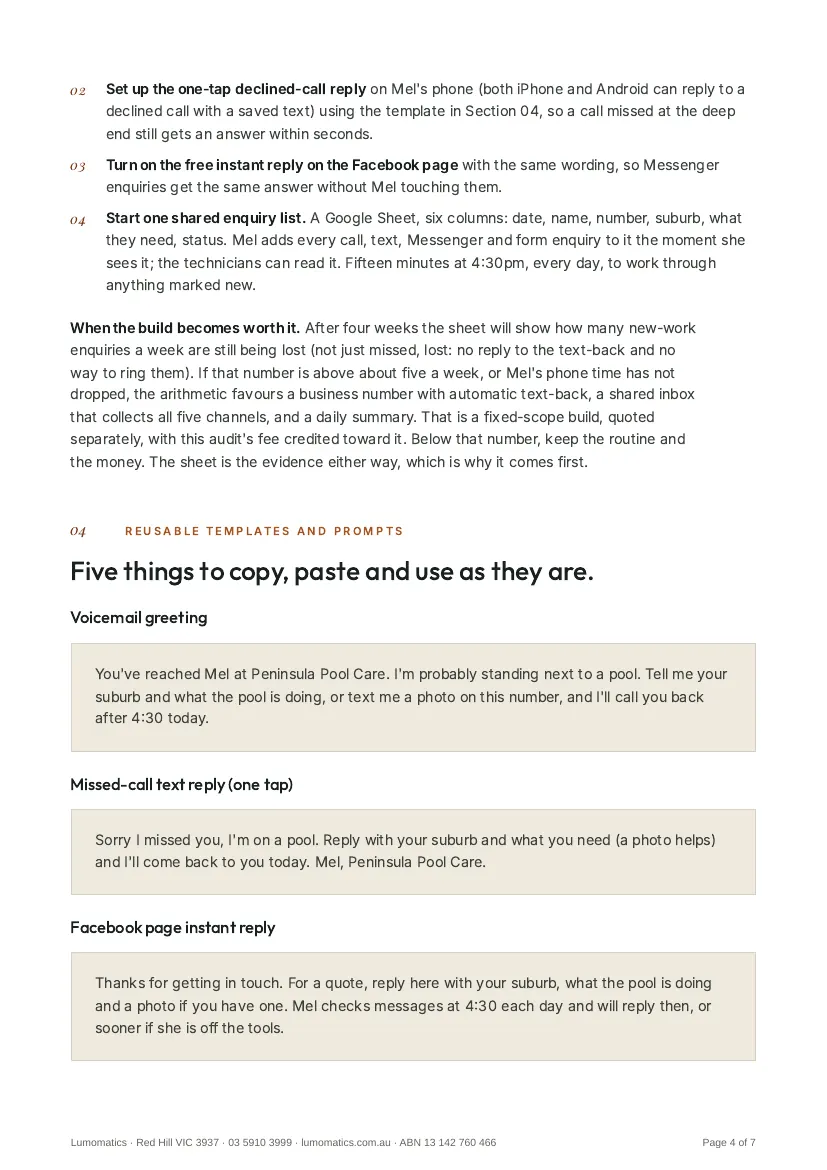
- Rewrite the voicemail greeting so a missed call still captures the job: ask for the suburb, what the pool is doing, and a photo by text. Callers who text a photo have qualified themselves. The wording is in Section 04.
- Set up the one-tap declined-call reply on Mel's phone (both iPhone and Android can reply to a declined call with a saved text) using the template in Section 04, so a call missed at the deep end still gets an answer within seconds.
- Turn on the free instant reply on the Facebook page with the same wording, so Messenger enquiries get the same answer without Mel touching them.
- Start one shared enquiry list. A Google Sheet, six columns: date, name, number, suburb, what they need, status. Mel adds every call, text, Messenger and form enquiry to it the moment she sees it; the technicians can read it. Fifteen minutes at 4:30pm, every day, to work through anything marked new.
When the build becomes worth it. After four weeks the sheet will show how many new-work enquiries a week are still being lost (not just missed, lost: no reply to the text-back and no way to ring them). If that number is above about five a week, or Mel's phone time has not dropped, the arithmetic favours a business number with automatic text-back, a shared inbox that collects all five channels, and a daily summary. That is a fixed-scope build, quoted separately, with this audit's fee credited toward it. Below that number, keep the routine and the money. The sheet is the evidence either way, which is why it comes first.
04
Reusable templates and prompts: five things to copy, paste and use as they are
Voicemail greeting
You've reached Mel at Peninsula Pool Care. I'm probably standing next to a pool. Tell me your suburb and what the pool is doing, or text me a photo on this number, and I'll call you back after 4:30 today.
Missed-call text reply (one tap)
Sorry I missed you, I'm on a pool. Reply with your suburb and what you need (a photo helps) and I'll come back to you today. Mel, Peninsula Pool Care.
Facebook page instant reply
Thanks for getting in touch. For a quote, reply here with your suburb, what the pool is doing and a photo if you have one. Mel checks messages at 4:30 each day and will reply then, or sooner if she is off the tools.
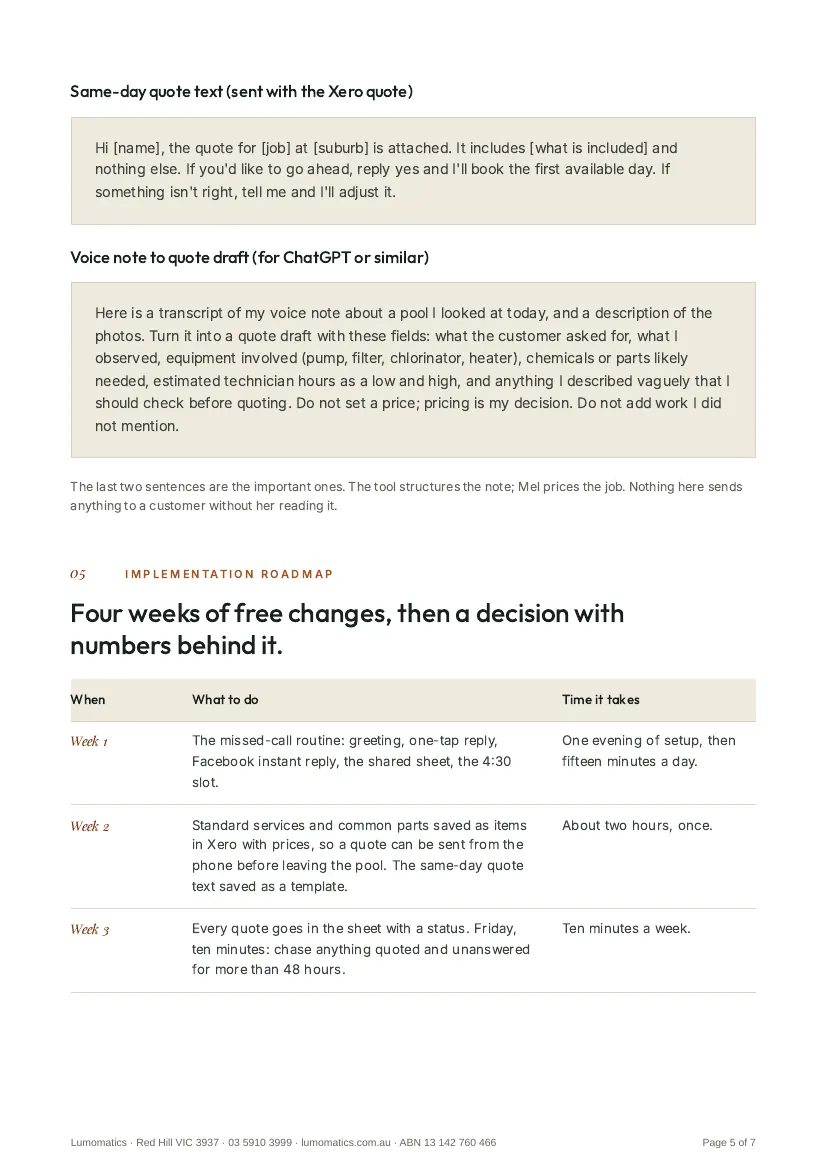
Same-day quote text (sent with the Xero quote)
Hi [name], the quote for [job] at [suburb] is attached. It includes [what is included] and nothing else. If you'd like to go ahead, reply yes and I'll book the first available day. If something isn't right, tell me and I'll adjust it.
Voice note to quote draft (for ChatGPT or similar)
Here is a transcript of my voice note about a pool I looked at today, and a description of the photos. Turn it into a quote draft with these fields: what the customer asked for, what I observed, equipment involved (pump, filter, chlorinator, heater), chemicals or parts likely needed, estimated technician hours as a low and high, and anything I described vaguely that I should check before quoting. Do not set a price; pricing is my decision. Do not add work I did not mention.
The last two sentences are the important ones. The tool structures the note; Mel prices the job. Nothing here sends anything to a customer without her reading it.
05
Implementation roadmap: four weeks of free changes, then a decision with numbers behind it
- Week 1: The missed-call routine: greeting, one-tap reply, Facebook instant reply, the shared sheet, the 4:30 slot. One evening of setup, then fifteen minutes a day.
- Week 2: Standard services and common parts saved as items in Xero with prices, so a quote can be sent from the phone before leaving the pool. The same-day quote text saved as a template. About two hours, once.
- Week 3: Every quote goes in the sheet with a status. Friday, ten minutes: chase anything quoted and unanswered for more than 48 hours.
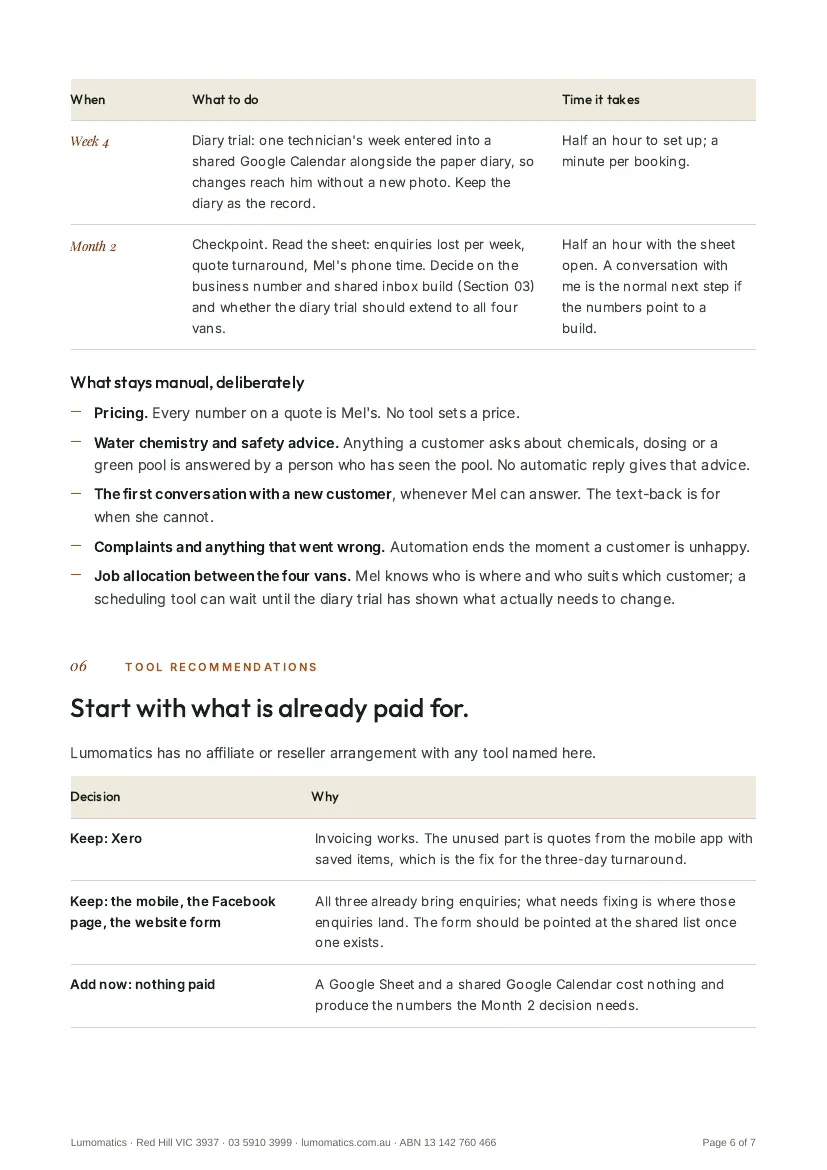
- Week 4: Diary trial: one technician's week entered into a shared Google Calendar alongside the paper diary, so changes reach him without a new photo. Keep the diary as the record.
- Month 2 checkpoint: Read the sheet: enquiries lost per week, quote turnaround, Mel's phone time. Decide on the business number and shared inbox build (Section 03) and whether the diary trial should extend to all four vans. A conversation with me is the normal next step if the numbers point to a build.
What stays manual, deliberately
- Pricing. Every number on a quote is Mel's. No tool sets a price.
- Water chemistry and safety advice. Anything a customer asks about chemicals, dosing or a green pool is answered by a person who has seen the pool. No automatic reply gives that advice.
- The first conversation with a new customer, whenever Mel can answer. The text-back is for when she cannot.
- Complaints and anything that went wrong. Automation ends the moment a customer is unhappy.
- Job allocation between the four vans. Mel knows who is where and who suits which customer; a scheduling tool can wait until the diary trial has shown what actually needs to change.
06
Tool recommendations: start with what is already paid for
Lumomatics has no affiliate or reseller arrangement with any tool named here.
- Keep: Xero. Invoicing works. The unused part is quotes from the mobile app with saved items, which is the fix for the three-day turnaround.
- Keep: the mobile, the Facebook page, the website form. All three already bring enquiries; what needs fixing is where those enquiries land. The form should be pointed at the shared list once one exists.
- Add now: nothing paid. A Google Sheet and a shared Google Calendar cost nothing and produce the numbers the Month 2 decision needs.
- Decide at Month 2: a business number with text-back and a shared inbox. One number in front of Mel's mobile, an automatic reply within a minute, transcribed voicemail, every channel into one list, a 7am summary. Worth it if the sheet shows more than about five enquiries a week still being lost. Quoted separately; the audit fee credits toward it.
- Decide at Month 2: job scheduling software. Only if the shared calendar trial shows the diary is the problem rather than the photo of it. For four vans a trade-specific tool is the realistic candidate; the calendar trial is the data that makes the choice obvious.
- Skip for now: a website rebuild (the site is fine), a website chatbot (enquiries are phone-first), an AI email assistant (five emails a week), paid advertising (the technicians are already busy), and a full job-management system before the simpler fixes have been measured.